
Views: 222 Author: Amanda Publish Time: 2026-01-14 Origin: Site


Content Menu
● Understanding SOLIDWORKS Certification Exams
● Is Rapid Prototyping Explicitly on the Exam?
● How Rapid Prototyping Connects to Exam Topics
>> Drafting and Drawing Competence
>> Part Modeling for Real Prototypes
>> Assembly Modeling and Functional Prototypes
● Using Rapid Prototyping as an Exam Study Strategy
>> Turn Practice Parts into Prototype Candidates
>> Treat Assemblies as Functional Systems
● Critical SOLIDWORKS Features for Rapid Prototyping
● Working with a Rapid Prototyping Factory Like Shangchen
● Why Certification Matters to Rapid Prototyping Customers
● FAQs About Rapid Prototyping and the SOLIDWORKS Exam
>> 1. Does the SOLIDWORKS CSWA exam specifically test Rapid Prototyping?
>> 2. How can I use Rapid Prototyping projects to prepare for SOLIDWORKS exams?
>> 3. Do I need to understand manufacturing processes to pass the SOLIDWORKS exam?
>> 4. Which SOLIDWORKS features are most valuable for Rapid Prototyping and exams?
>> 5. How does Shangchen support SOLIDWORKS‑based Rapid Prototyping for overseas buyers?
Rapid Prototyping has become one of the most important real‑world applications of SOLIDWORKS, but it is not listed as a separate, explicit topic in official exam blueprints such as CSWA or CSWP. Instead, Rapid Prototyping is deeply embedded in the skills these exams measure: accurate part modeling, smart use of design intent, efficient assembly creation, and professional drawings that can drive CNC machining, 3D printing, sheet metal fabrication, and mold production.
For overseas brands and OEM buyers working with a Chinese factory like Shangchen, the same SOLIDWORKS skills that help candidates pass certification exams are exactly what transform initial design ideas into reliable Rapid Prototyping parts and small‑batch production.
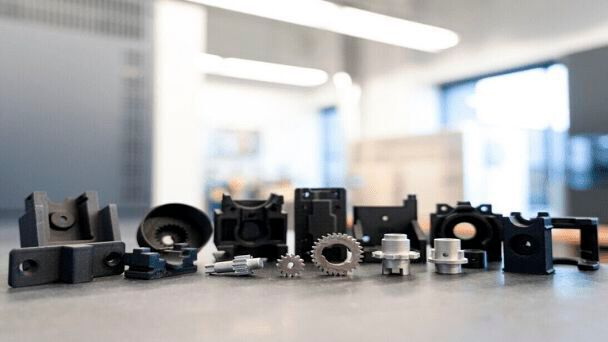
SOLIDWORKS certification exams are designed to test real design and modeling ability under time pressure, not just theoretical knowledge. The most popular certifications are:
- CSWA (Certified SOLIDWORKS Associate) – entry‑level exam that validates fundamental skills.
- CSWP (Certified SOLIDWORKS Professional) – advanced exam that demonstrates strong, practical modeling capability.
Both exams focus heavily on tasks that mirror daily engineering work, which also form the foundation of a robust Rapid Prototyping workflow.
When candidates look through exam guides, they rarely see the phrase “Rapid Prototyping” listed as a dedicated section. Instead, the content is described in terms of:
- Drafting competencies and drawing functionality.
- Basic, intermediate, and advanced part creation and modification.
- Assembly creation, mates, and interference checks.
However, Rapid Prototyping is essentially the application of these same skills to quickly transform SOLIDWORKS models into physical parts via CNC machining, 3D printing, sheet metal fabrication, or mold‑based processes. If a candidate is strong in Rapid Prototyping workflows, that candidate will naturally be strong in the modeling and assembly challenges that appear on the SOLIDWORKS exam.
In practice, everything examined—creating parts from 2D drawings, modifying dimensions, using design tables, building assemblies, and checking mass properties—maps directly onto the work required to support modern Rapid Prototyping in a factory environment.
Rapid Prototyping is not a separate subject; it is the real‑world context that makes SOLIDWORKS skills valuable. Understanding this connection helps candidates prepare more effectively and shows OEM buyers why certified designers are better partners.
Drawings are critical in both exam tasks and manufacturing:
- Candidates must recognize standard and section views, dimensions, and basic drawing operations.
- In Rapid Prototyping, clear drawings ensure that CNC machinists, sheet metal technicians, and mold makers correctly interpret design intent.
If a drawing produced in SOLIDWORKS is ambiguous, a Rapid Prototyping run may fail due to thickness errors, missing tolerances, or misaligned features. The drafting portion of the exam ensures that future professionals can produce drawings that support a smooth transition from digital design to physical prototype.
Rapid Prototyping depends on accurate, robust 3D models. The SOLIDWORKS exam reflects this by emphasizing:
- Core features like extrudes, cuts, revolves, lofts, patterns, fillets, chamfers, and shells.
- Parametric control through dimensions, relations, and equations.
- Careful attention to design intent so that changes propagate correctly.
In a Rapid Prototyping job, a single change—such as adjusting wall thickness for 3D printing or CNC machining viability—should update the entire model without breaking features. The exam rewards this kind of intelligent modeling and penalizes designs that collapse when dimensions change.
Assemblies are where many Rapid Prototyping projects either succeed or fail. SOLIDWORKS exams test:
- Proper use of mates to define motion and constraints.
- Collision and interference detection.
- Building subassemblies and replacing parts while keeping overall design intent.
In a Rapid Prototyping environment, these skills allow engineers to:
- Validate fit and motion before spending money on physical parts.
- Identify interferences that would cause assembly problems.
- Explore alternate component configurations without remodeling from scratch.
OEM clients expect their Rapid Prototyping supplier to identify and solve such issues at the virtual stage, minimizing costly rework.
One of the most effective ways to prepare for SOLIDWORKS exams is to treat every practice exercise as if it were a real Rapid Prototyping project destined for CNC machining, 3D printing, or precision sheet metal processing at a factory like Shangchen.
When working through practice models:
- Model parts from 2D drawings with the same discipline required by the exam.
- Check mass properties and volumes to ensure that parts make sense for the chosen material and process.
- Imagine how each part would be manufactured—machined, printed, bent, or molded—and adapt geometry accordingly.
This approach creates a direct bridge between exam preparation and real Rapid Prototyping work.
For assemblies, study as if preparing to send the entire design to a Rapid Prototyping supplier:
- Use proper mates that reflect real hinges, sliders, fasteners, and constraints.
- Run interference checks to verify that motion is possible and that clearances are realistic.
- Think about how the prototype will be assembled on the shop floor—step by step.
By learning to think like a manufacturing engineer while modeling, candidates become more confident in both exam situations and production projects.

While the exams do not list Rapid Prototyping as a topic, the features most used in Rapid Prototyping are heavily tested. The following capability areas are especially important for both exam success and production readiness:
- Sketching and relations: Clean sketches with correct constraints build robust models that can withstand dimensional changes.
- Feature‑based modeling: Using extrude, revolve, loft, sweep, and patterns intelligently speeds up design work and enables complex prototypes.
- Design intent and equations: Linking key dimensions through equations allows quick iteration—essential for Rapid Prototyping rounds.
- Configurations and design tables: Multiple configurations let designers explore several prototype options (e.g., different hole patterns or thicknesses) inside a single SOLIDWORKS file.
- Assemblies and mates: Solid assemblies reveal how parts interact and whether a Rapid Prototyping build will function as expected.
- Mass properties and material assignment: Weight, center of mass, and volume checks are crucial for parts that will later be CNC machined, 3D printed, or molded in specific materials.
Exam candidates who focus on these areas build a solid foundation for Rapid Prototyping and OEM collaboration.
Shangchen is a Chinese manufacturing factory focused on high‑speed product development and OEM services for overseas brands, wholesalers, and producers. The workflow typically follows a consistent pattern:
1. CAD Intake
Customers send SOLIDWORKS models, STEP files, or drawings for new projects. Engineers import and verify these files, often using skills very similar to exam tasks: checking dimensions, repairing sketches, and confirming feature history.
2. Design for Manufacturing (DFM) Review
The engineering team evaluates whether the model is suitable for CNC machining, turning, sheet metal fabrication, 3D printing, or mold making. If needed, they adjust geometry or propose alternatives while preserving design intent.
3. Rapid Prototyping Execution
With a validated model, Shangchen's teams create prototypes through:
- CNC milling and turning for metal and plastic parts.
- 3D printing for quick form‑fit prototypes or complex geometries.
- Sheet metal fabrication for enclosures, brackets, and structural parts.
- Mold production for pilot runs or soft tooling before mass production.
4. Testing and Iteration
Physical prototypes are inspected, measured, and tested. Feedback is translated into updated SOLIDWORKS models—often using configurations or parametric changes—before the next Rapid Prototyping round.
5. Transition to Small‑Batch or Mass Production
Once the Rapid Prototyping stage is complete, the same SOLIDWORKS models are used to launch precision batch production or full‑scale manufacturing.
Throughout this process, the exact same modeling, drafting, and assembly skills validated by SOLIDWORKS exams are applied every day inside the factory.
From the customer's perspective, working with engineers who understand SOLIDWORKS at an exam‑certified level offers several advantages:
- Higher reliability: Certified users are less likely to create unstable models, reducing failure risk during Rapid Prototyping or production.
- Faster iteration: Professionals trained for exam‑level challenges can modify designs quickly, shortening development cycles.
- Better communication: Shared knowledge of SOLIDWORKS standards, features, and workflows makes it easier to collaborate across borders and time zones.
For a factory like Shangchen, employing or cooperating with SOLIDWORKS‑certified engineers strengthens the entire Rapid Prototyping and CNC machining service, making it more attractive to overseas OEM buyers.
Rapid Prototyping is not labeled as a separate category on the official SOLIDWORKS exam outlines, but in practice it is present in almost every skill the exams measure. The ability to build accurate parametric models from drawings, manage design intent, create assemblies, and produce clear technical drawings is essential for both exam success and high‑quality Rapid Prototyping work. For overseas brands and OEM customers partnering with Shangchen, the value of SOLIDWORKS certification is felt directly in faster turnaround, fewer errors, and smoother transitions from prototype to precision batch production and full‑scale manufacturing. By studying SOLIDWORKS with Rapid Prototyping in mind, candidates not only increase their chances of passing CSWA or CSWP, they also prepare themselves to operate effectively in a global manufacturing environment where digital models must become real parts quickly and reliably.

The CSWA exam does not include a named “Rapid Prototyping” section, but almost every task supports Rapid Prototyping in practice. You are asked to create parts from 2D drawings, modify dimensions, assign materials, and build assemblies—exactly the steps required before sending a design for CNC machining, 3D printing, or sheet metal fabrication. When you master these exam tasks, you automatically gain the core skills needed to run effective Rapid Prototyping projects with a factory like Shangchen.
Treat each Rapid Prototyping job as an exam‑level modeling challenge. Start from a 2D drawing or concept, build a fully constrained 3D model, assign suitable material, and check mass properties. Then create a small assembly or a drawing that could be used on the shop floor. By doing this, you practice the same operations that the CSWA and CSWP exams measure, while also building a portfolio of real Rapid Prototyping work that shows employers and OEM customers your capabilities.
You can pass the SOLIDWORKS exam without deep knowledge of individual manufacturing processes, because the tests are focused on CAD operations. However, a basic understanding of CNC machining, 3D printing, sheet metal rules, and mold design makes your models more realistic and easier to manufacture. This is particularly important when working with a Rapid Prototyping factory like Shangchen, where manufacturability and cost are just as important as geometric accuracy.
For both exams and Rapid Prototyping, the most valuable features include robust sketching and relations, extrude and revolve features, fillets and chamfers, patterns, shell, reference geometry, assemblies, mates, configurations, and mass property analysis. These tools allow you to design parts that can be modified quickly, tested virtually in assemblies, and then manufactured through CNC machining, 3D printing, sheet metal fabrication, or molding. The better you understand these features, the smoother your transition from exam practice to real Rapid Prototyping projects.
Shangchen accepts SOLIDWORKS models directly, reviews them for manufacturability, and then converts them into Rapid Prototyping jobs across CNC machining, turning, sheet metal fabrication, 3D printing, and mold production. The engineering team can also help optimize models for specific processes—for example, adjusting wall thickness for 3D printing or modifying draft angles for molding—while preserving the original design intent. This combination of SOLIDWORKS expertise and full‑service Rapid Prototyping capability enables overseas brands, wholesalers, and manufacturers to move efficiently from concept to market‑ready products.

